
Build a base station using Unicore UM98x receiver
WARNING
UM980 model is the recommended receiver for building a base station. Even if you can find the compatible UM982 at a lower price, it is not recommended for this use case. The UM982 is primarily designed for rover application with heading provided by the dual antennas setup.
Bill of materials
Here is the list of items needed to set up a full-frequency GNSS base using the Unicore UM980/UM982:

| Hardware | Price (excl. VAT) |
|---|---|
| simpleRTK3B Budget or UM980 RTK GNSS receiver | ~200€ |
| BT-800S or Budget Survey Tripleband GNSS Antenna | ~100€ |
Firmware Update
To update the firmware, first download the software UPrecise (Windows only).
Also download the latest version of the firmware.
- Open UPrecise, then wait for the board to be detected after connecting it to the PC.
- Click Receiver upgrade in the vertical menu on the left.
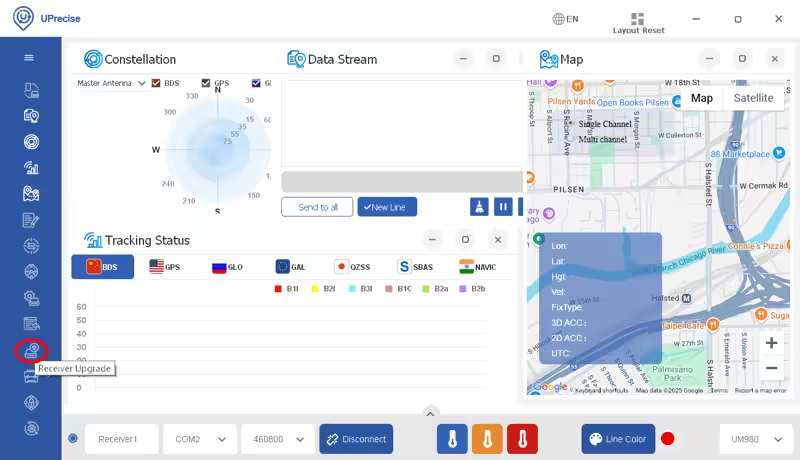
- A new window will open.
- Choose the firmware file (
.pkg) by clicking Select upgrade file. - Select Soft reset, then start the update.
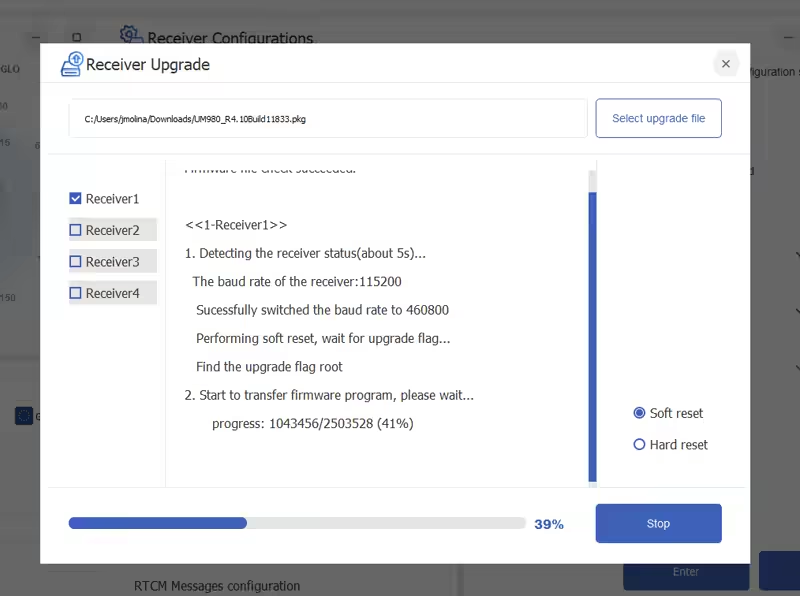
- The process may take some time; follow the progress bar.
Assembly
First perform an initial setup without the enclosure:
- Mount the antenna on its support.
- Connect the antenna cable to the GNSS receiver.
- Connect the USB cable between the GNSS receiver and the Raspberry Pi / Orange Pi.
- Connect the RJ45 Ethernet cable to your network (internet router, powerline adapter, RJ45 wall socket).
- Prepare the power supply, but do not power it on yet.
Finally
- Take the 16GB Micro SD card and move on to the next step: Software installation.