
Use Centipede-RTK on John Deere agricultural equipment
| John Deere Star Fire SF3000 Antenna | John Deere Star Fire SF6000 Antenna |
|---|---|
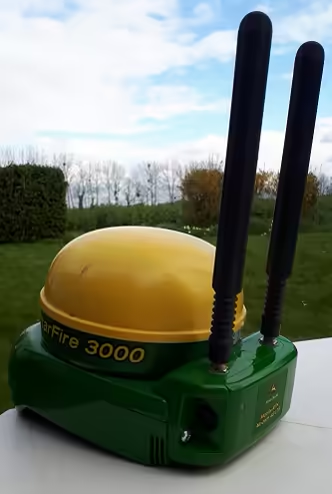 | TODO: photo to insert |
| SF3000, Deluxe bracket, Mobile RTK modem 4G LTE | SF6000, Mobile RTK modem 4G LTE |
This wiki was mainly created using a CommandCenter 4, an SF3000 antenna version 2.80S, between March 2021 (photos taken) and December 2021 (final writing before publication in V1.0). See the version table and document sources at the bottom of the page.
1) Prerequisites
The StarFire antenna (3000 or 6000) must be equipped with a JD Mobile RTK Modem 4G LTE.
To mount the modem on the antenna, follow this document: (link to the modem installation documentation: DOC3 at the bottom of the page)
- SIM card insertion and modem preparation: pages 7 and 8
- Modem assembly with an SF6000: pages 9 and 10
- Modem assembly with an SF3000 (Deluxe housing): pages 11 and 12
Required conditions for John Deere Mobile RTK (excerpt p30-1): (see DOC2 at the bottom of the page)
- GreenStar™ 3 or 4th generation console with AutoTrac™ activation
- One of the following StarFire™ receivers:
- StarFire™ 3000 receiver with SF2 Ready activation, RTK Ready activation, and John Deere Mobile RTK access license
- StarFire™ 6000 receiver with SF3 Ready activation, RTK Ready activation, and John Deere Mobile RTK access license
- John Deere Mobile RTK 4G LTE modem
- Cellular network provider (third-party provider: Orange, etc.)
- RTK correction data provider (third-party provider: Centipede-RTK for example)
The modem must first be configured (via an Ethernet cable) to work with either an SF3000 or an SF6000 (see p60-B1 to 60-B7 of DOC2)
<TODO: section to be clarified>
2) Check my licenses
Access the antenna configuration screen (see page 30-2 of DOC2), then go to the Activations tab.
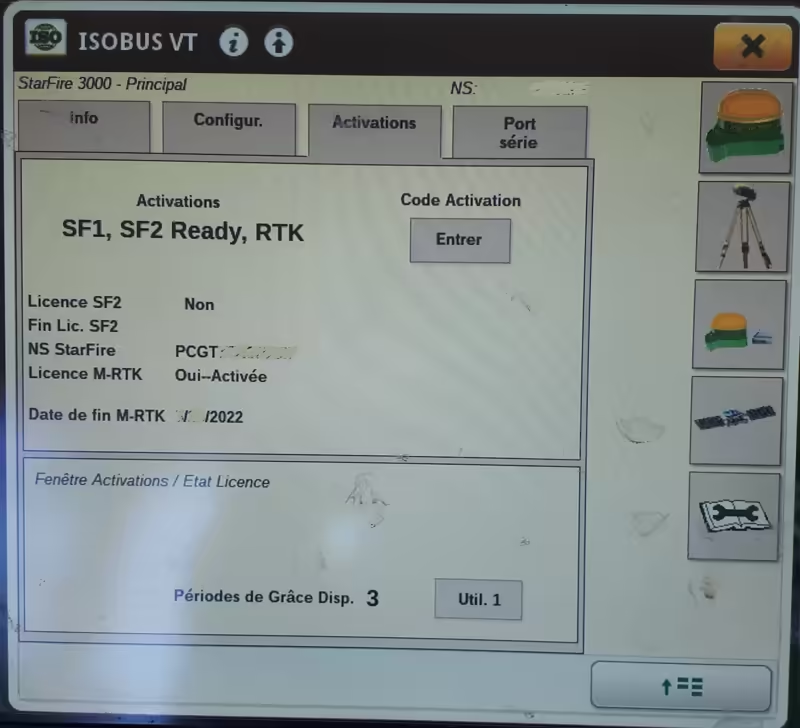
Activation tab of an SF3000 on CommandCenter 4
For Centipede-RTK to work, you will need the same licenses as above: SF1, SF2 or SF3 Ready, RTK, as well as a Mobile RTK license (1 year or 5 years).
3) Configure my SIM card and the M-RTK serial port
Access the StarFire RTK Mobile page from the antenna page by pressing the following button from the antenna screen:
| John Deere Star Fire SF3000 Antenna | John Deere Star Fire SF6000 Antenna |
|---|---|
 |  |
| icon to access the RTK Mobile page on an SF3000 | icon to access the RTK Mobile page on an SF6000 |
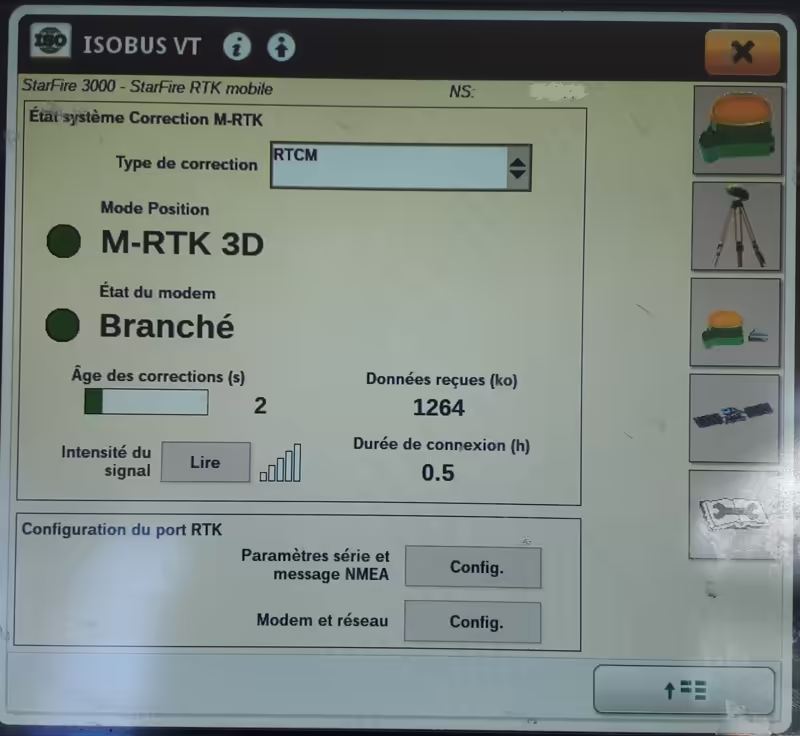
StarFire RTK Mobile page of an SF3000 on a Command Center 4
To configure the M-RTK serial port, press Serial Settings and NMEA Message: Config
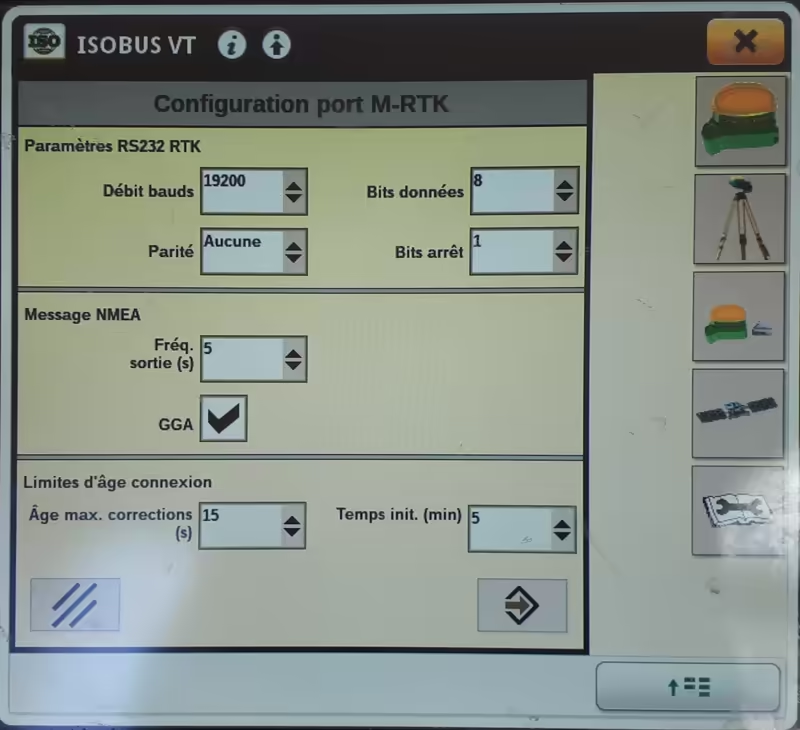
configuration of the JD LTE modem serial / NMEA port
The RS232 RTK parameters are 19200 / 8 / N / 1
The NMEA messages are output frequency 5 and GGA checked
Connection age limits:
- Max Age: 15s
- Min Init Time: 5
Press Cancel or Confirm as desired:
| Cancel | Confirm |
|---|---|
 |  |
To configure the SIM card, press Modem and Network: Config
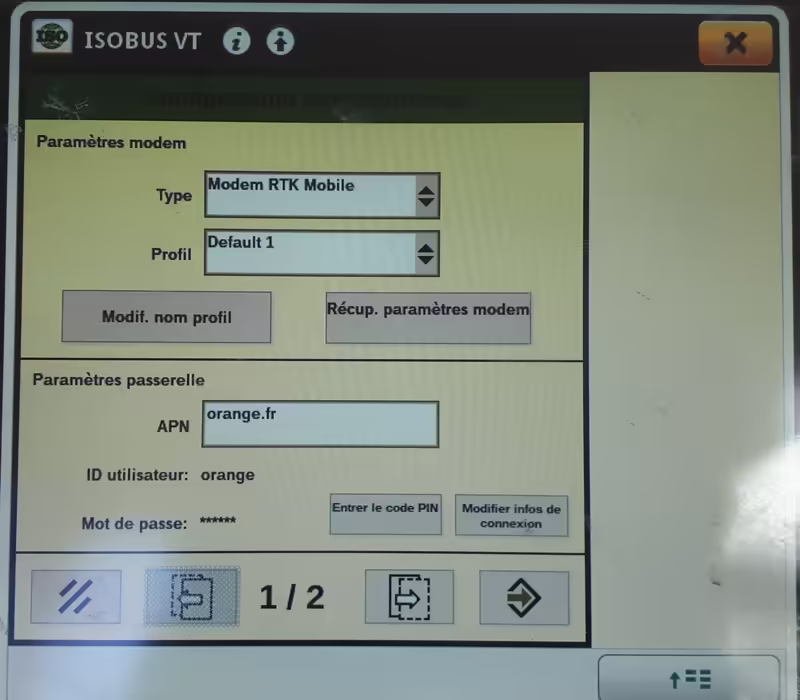
configuration of the SIM card for an Orange SIM sold with an AirBox
To use advanced features (profile creation, etc.), refer to pages 60A-1 and 60A-2 of DOC2.
If you are testing with an antenna already configured for another RTK correction provider (not Centipede) or another internet provider (SIM change), create a new profile and use the modem parameter retrieval functions so you can keep your original settings.
(TODO: tutorial to complete for this operation)
The Gateway parameters depend on the provider and the SIM card.
Examples of parameters for encountered providers:
| Provider | Subscription Type | APN | User ID | Password |
|---|---|---|---|---|
| Orange | Let's Go 10GB plan | orange.fr | orange | orange |
| TODO | Complete this table | xxx | xxxx | xxxxx |
To move to RTK correction parameter configuration, press Next Page.
Otherwise press Cancel or Confirm.
| Cancel | Previous Page | Next Page | Confirm |
|---|---|---|---|
|  |  | |
4) Configure Centipede
To display this screen, follow step 3) Configure my SIM card, then press Next Page.
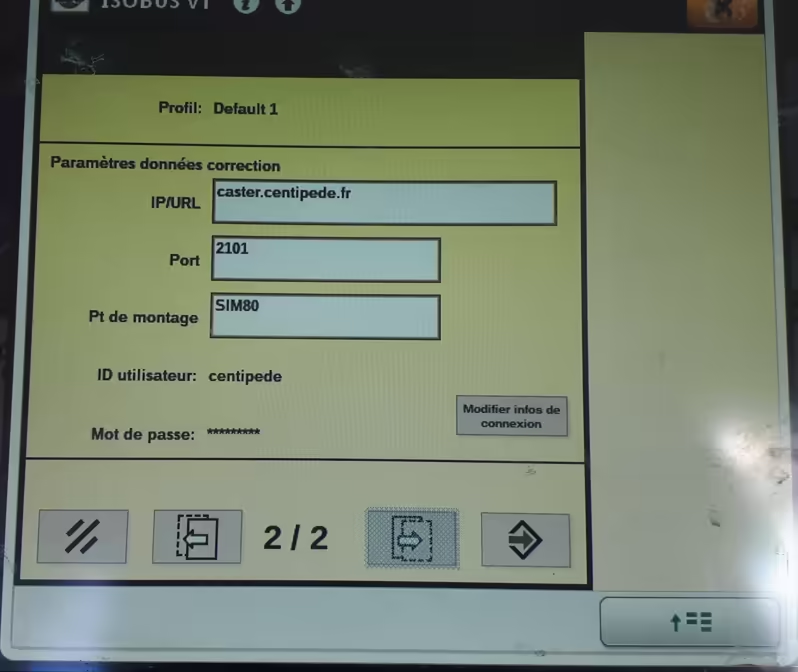
configuration on the Centipede-RTK caster SIM80 base
Enter the following information:
IP/URL: crtk.net
Port: 2101
Mount point: choose the closest / most suitable base for your geographic location in UPPERCASE
Use this map to find the nearest base:
https://map.centipede-rtk.org/index.php/view/map?repository=cent&project=centipede
To enter User ID and password, press Edit Connection Info
User ID: centipede
Password: centipede
Do not forget to press Confirm until you return to the StarFire RTK Mobile screen.
For more details, refer to page 60A-3 of DOC2.
5) Does it work?
The image below shows the antenna in operation.
- Position Mode must be M-RTK 3D
- Modem status must be Connected
- Correction age must be 2 seconds or less
- The received data counter should increase by several KB per second
(I observed consumption of a little over 2 MB per hour)
Reference documents
DOC1: PFP12907_John_Deere_Mobile_RTK_FR.pdf – John Deere RTK Mobile Reference Guide
PFP12907_John_Deere_Mobile_RTK_FR.pdfDOC2: OMPFP21126.pdf – John Deere Mobile RTK 4G LTE Modem Service Manual, Edition F1 (French)
OMPFP21126.pdfDOC3: PFP22140_28.pdf – John Deere Mobile RTK 4G LTE Modem Installation Instructions, 21JUN21 (French)
PFP22140_28.pdf
| Version | Date | Author | Changes Made |
|---|---|---|---|
| V0.1 | 02/12/2021 | AgroGeek (SB) | typos and addition of version/modification table to the initial version |
| V0.2 | 03/12/2021 | AgroGeek (SB) | added section 3) Configure the antenna serial port |
| V0.3 | 03/12/2021 | AgroGeek (SB) | added M-RTK serial port configuration in section 4) and antenna version in header |
| V0.4 | 03/12/2021 | AgroGeek (SB) | removed section 3) Configure the antenna serial port |
| Version | Date | Author | Pending Modifications |
|---|---|---|---|
| V0.1 | 02/12/2021 | AgroGeek (SB) | Photo of an SF6000 in the introduction |
| V0.1 | 02/12/2021 | AgroGeek (SB) | Modem configuration for SF3000 or SF6000 |
| V0.1 | 02/12/2021 | AgroGeek (SB) | Replace DOC2 and DOC3 text with links |
| V0.1 | 02/12/2021 | AgroGeek (SB) | SIM card configuration: tutorial for creating new configuration datasets |
| V0.1 | 02/12/2021 | AgroGeek (SB) | Complete the provider table |