
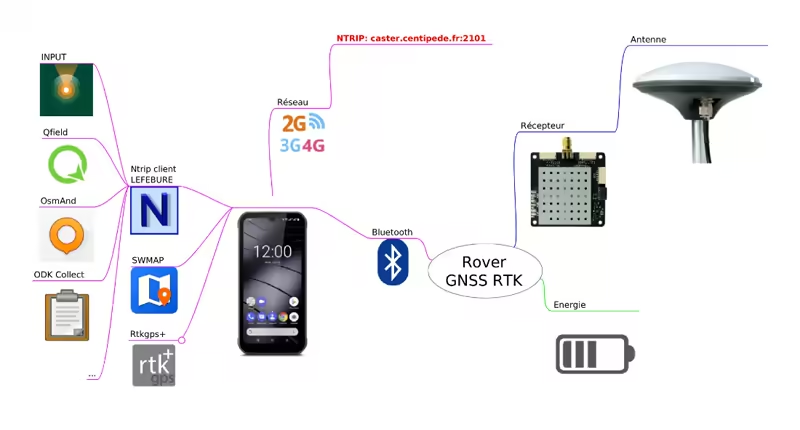
RTK rover with smartphone applications
To be noted that currently all the solutions require an external RTK receiver and antenna. The smartphone's internal GNSS receiver is not yet capable of providing RTK-level precision. However, the applications mentioned below allow you to connect an external RTK receiver (such as a U-blox F9P) to your smartphone via Bluetooth or USB, enabling you to receive RTK corrections and achieve centimeter-level positioning accuracy on your mobile device.
Lefebure Application (Proprietary)

The Lefebure NTRIP Client application for Android allows you to send corrections from a mount point on the Centipede-RTK network to the GNSS receiver (ublox-F9P) and receive a corrected NMEA stream.
The Enable Mock Location option allows your RTK GNSS receiver to be used for geolocation across all applications on your Android smartphone/tablet, such as GIS tools like Mergin Maps, Qfield, and OsmAnd.
It is possible to save multiple usage profiles depending on your movement between Centipede-RTK network mount points.
Lefebure NtripClient on the Play Store
Lefebure NtripClient documentation
Tutorial: Using a Rover with Centipede-RTK and Lefebure (french)
Bluetooth GNSS (Open Source)

An equivalent to the Lefebure application but open source. This application supports merging data streams from an NTRIP server for professional RTK positioning.
The application displays precision estimates from U-Blox PUBX precision messages instead of the commonly used HDOP × CEP method.
This PUBX precision reading corresponds exactly to the same precision source shown in the U-Center PC tool when it is connected directly to M8030 (EcoDroidGPS) or ZED-F9P (EcoDroidGPS + ArduSimple) devices via USB.
Bluetooth GNSS on the Play Store
SW MAPS Application (Proprietary)

SW Maps is a free GIS and mobile mapping application for collecting, presenting, and sharing geographic information.
Whether you are conducting a large-scale GNSS survey using high-precision instruments, collecting large amounts of location data using only your phone, or simply displaying shapefiles with labels on a background map while in the field, SW Maps supports all these use cases.
You can record points, lines, polygons, and even photos, display them on your chosen background map, and attach custom attribute data to any feature. Supported attribute types include text, numbers, predefined choice lists, photos, audio clips, and videos.
Perform high-precision GPS surveys using RTK-compatible external receivers via Bluetooth or USB Serial.
Draw features on the map by adding markers and measure distances and areas.
Reuse layers and attributes from a previous project for another survey, or create templates and share them with other users.
Share collected data with others as Geopackages, KMZ, or shapefiles, or export them to your device storage. Data can also be exported as spreadsheets (XLS / ODS) or CSV files.
SWMAPS on the Play StoreSW Maps on the App Store
Tutorial: Using SW Maps with an RTK Surveyor and Centipede-RTK